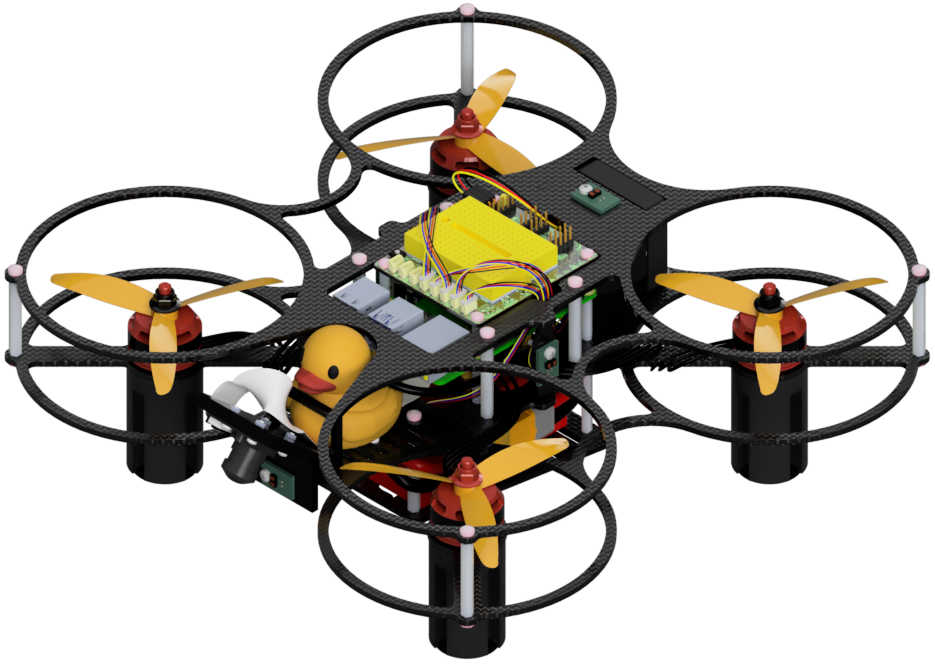
Initializing the Flight Controller
Contents
What you will need
A base station computer running Linux (Ubuntu) or macOS
“Mamba” (DD24-B) Flight Controller
A data-capable USB-A-to-USB-C cable
What you will get
A “Mamba” Flight Controller running PX4
Initializing the Flight Controller#
To make the flashing process as deterministic as possible, it is performed entirely from the command line with dfu-util. In this way the procedure is fully scriptable and does not depend on internal mechanics of a graphical flasher.
Note
The flashing is a two-stage process:
Flash the PX4 bootloader (the
omnibusf4sd_blbootloader, which is the canonical bootloader for STM32F405-based boards using PX4 board ID42, including the Diatone Mamba F405 MK2 V2).Flash the PX4 firmware built for the
mamba-f405-mk2target on top of the bootloader.
Both stages are performed via dfu-util while the Flight Controller is in STM32 DFU mode.
1. Install dfu-util#
Install dfu-util on the base station. Pick the tab matching its operating system.
sudo apt update
sudo apt install dfu-util
brew install dfu-util
Note
macOS does not need udev rules: dfu-util accesses USB devices directly via IOKit, without requiring sudo. Run the dfu-util commands in this guide without sudo.
Checkpoint ✅#
Test
Use dfu-util version >= 0.9. Older versions may silently truncate writes on STM32F4 targets. The Homebrew formula ships 0.11, which is the version the procedure has been validated on. Check the installed version with:
dfu-util --version
Expected Result
dfu-util 0.11

Copyright 2005-2009 Weston Schmidt, Harald Welte and OpenMoko Inc.
Copyright 2010-2021 Tormod Volden and Stefan Schmidt
This program is Free Software and has ABSOLUTELY NO WARRANTY
Please report bugs to http://sourceforge.net/p/dfu-util/tickets/
2. Boot the Flight Controller in DFU mode#
Disconnect the LiPo battery if it is connected, and unplug the USB cable from the base station.
Note
On a fully assembled Duckiedrone, the Flight Controller USB cable is plugged into the Raspberry Pi. Unplug it at the Raspberry Pi end and use it to connect the Flight Controller to the base station.
Connect the Flight Controller to the base station with the USB-A cable while keeping the BOOT button on the side of the Flight Controller pressed.
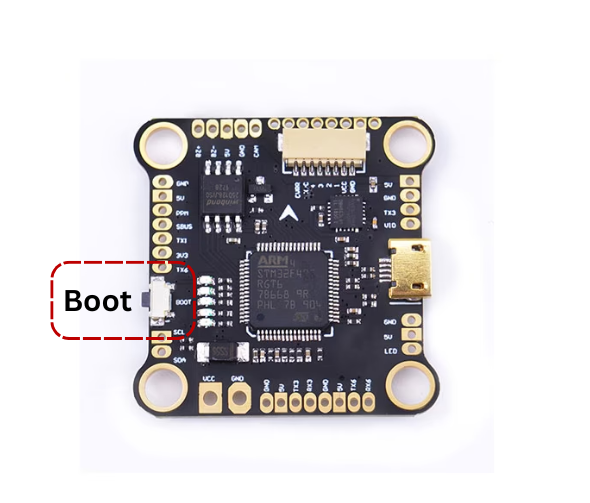
Fig. 60 Mamba DD24-B Flight Controller BOOT button location.#
After a couple of seconds, release the BOOT button.
Verify that the board is enumerated as an STM32 DFU device:
dfu-util -l
The output lists one or more interfaces with the vendor/product ID 0483:df11 (“STMicroelectronics STM Device in DFU Mode”), as in the following image:
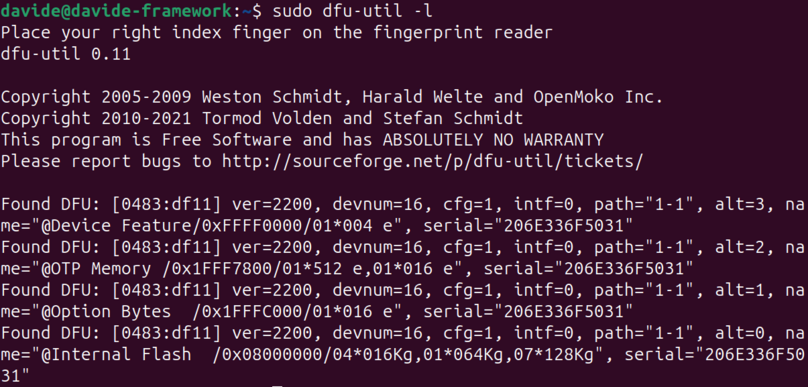
Fig. 61 Output of dfu-util -l with the Flight Controller in DFU mode.#
3. Flash the PX4 bootloader#
Download the prebuilt omnibusf4sd_bl bootloader hex shipped with the PX4 user guide and convert it to a raw binary that dfu-util can flash. The conversion needs arm-none-eabi-objcopy from the ARM bare-metal toolchain:
sudo apt install binutils-arm-none-eabi   # provides arm-none-eabi-objcopy
curl -L -o omnibusf4sd_bl.hex \
  https://github.com/PX4/PX4-user_guide/raw/main/assets/flight_controller/omnibus_f4_sd/omnibusf4sd_bl_d52b70cb39.hex
arm-none-eabi-objcopy -I ihex -O binary omnibusf4sd_bl.hex omnibusf4sd_bl.bin
brew install --cask gcc-arm-embedded   # provides arm-none-eabi-objcopy
curl -L -o omnibusf4sd_bl.hex \
  https://github.com/PX4/PX4-user_guide/raw/main/assets/flight_controller/omnibus_f4_sd/omnibusf4sd_bl_d52b70cb39.hex
arm-none-eabi-objcopy -I ihex -O binary omnibusf4sd_bl.hex omnibusf4sd_bl.bin
Tip
If the PX4 dev toolchain is already installed via brew tap PX4/px4 && brew install px4-dev, skip the cask install: arm-none-eabi-objcopy is already on the PATH.
Bootloader hash URL 404s?
The bootloader hash suffix d52b70cb39 is tracked in the PX4 user guide; if the URL above 404s, re-resolve it from
the PX4 bootloader-from-Betaflight page.
The bootloader can also be built from source with make omnibusf4sd_bl from a clone of PX4/PX4-Bootloader.
With the Flight Controller still in DFU mode, flash the bootloader to address 0x08000000:
dfu-util -a 0 --dfuse-address 0x08000000:leave -d 0483:df11 -D omnibusf4sd_bl.bin
Explanation of the dfu-util command
-a 0: selects the first DFU alternate setting (the internal flash).--dfuse-address 0x08000000:leave: writes to the start of flash and reboots the board into the freshly written image after the write completes.-d 0483:df11: matches the STM32 ROM DFU device.-D omnibusf4sd_bl.bin: the file to flash.
Successful bootloader flashing output (macOS)
user@MacBook-Pro-2 ~ % dfu-util -a 0 --dfuse-address 0x08000000:leave -d 0483:df11 -D omnibusf4sd_bl.bin
dfu-util 0.11

Copyright 2005-2009 Weston Schmidt, Harald Welte and OpenMoko Inc.
Copyright 2010-2021 Tormod Volden and Stefan Schmidt
This program is Free Software and has ABSOLUTELY NO WARRANTY
Please report bugs to http://sourceforge.net/p/dfu-util/tickets/

dfu-util: Warning: Invalid DFU suffix signature
dfu-util: A valid DFU suffix will be required in a future dfu-util release
Opening DFU capable USB device...
Device ID 0483:df11
Device DFU version 011a
Claiming USB DFU Interface...
Setting Alternate Interface #0 ...
Determining device status...
DFU state(10) = dfuERROR, status(10) = Device's firmware is corrupt. It cannot return to run-time (non-DFU) operations
Clearing status
Determining device status...
DFU state(2) = dfuIDLE, status(0) = No error condition is present
DFU mode device DFU version 011a
Device returned transfer size 2048
DfuSe interface name: "Internal Flash  "
Downloading element to address = 0x08000000, size = 9612
Erase           [=========================] 100%         9612 bytes
Erase    done.
Download        [=========================] 100%         9612 bytes
Download done.
File downloaded successfully
Submitting leave request...
Transitioning to dfuMANIFEST state
Successful bootloader flashing output (Ubuntu)
jatinvira@ultron:~$ dfu-util -a 0 --dfuse-address 0x08000000:leave -d 0483:df11 -D omnibusf4sd_bl.bin
dfu-util 0.11

Copyright 2005-2009 Weston Schmidt, Harald Welte and OpenMoko Inc.
Copyright 2010-2021 Tormod Volden and Stefan Schmidt
This program is Free Software and has ABSOLUTELY NO WARRANTY
Please report bugs to http://sourceforge.net/p/dfu-util/tickets/

dfu-util: Warning: Invalid DFU suffix signature
dfu-util: A valid DFU suffix will be required in a future dfu-util release
Opening DFU capable USB device...
Device ID 0483:df11
Device DFU version 011a
Claiming USB DFU Interface...
Setting Alternate Interface #0 ...
Determining device status...
DFU state(10) = dfuERROR, status(10) = Device's firmware is corrupt. It cannot return to run-time (non-DFU) operations
Clearing status
Determining device status...
DFU state(2) = dfuIDLE, status(0) = No error condition is present
DFU mode device DFU version 011a
Device returned transfer size 2048
DfuSe interface name: "Internal Flash  "
Downloading element to address = 0x08000000, size = 9612
Erase           [=========================] 100%         9612 bytes
Erase    done.
Download        [=========================] 100%         9612 bytes
Download done.
File downloaded successfully
Submitting leave request...
Transitioning to dfuMANIFEST state
After the flash completes (this takes a few seconds), the board will reboot. It will now enumerate as a PX4 bootloader device under the 26AC USB vendor ID (e.g., 26AC:0011). Verify that it has come back up:
lsusb                         # look for a 26AC:xxxx entry
ls /dev/serial/by-id/
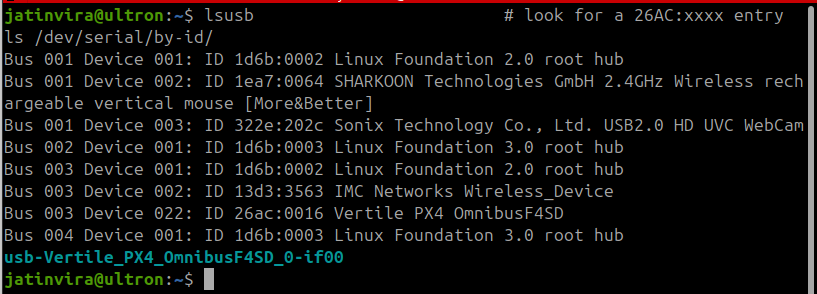
Fig. 62 Example successful lsusb output on Ubuntu.#
lsusb is not shipped with macOS. Use the built-in tools to enumerate USB and serial devices:
system_profiler SPUSBDataType | grep -A 3 -E "PX4|26AC"
ls /dev/tty.usbmodem*         # PX4 bootloader appears as e.g. /dev/tty.usbmodem01
Note
macOS does not populate /dev/serial/by-id/. The board is exposed only as /dev/tty.usbmodem* (and a matching /dev/cu.usbmodem*). It can take 1–2 seconds for the node to appear after the board reboots out of DFU.
4. Flash the PX4 firmware#
Download the PX4 firmware binary for the mamba-f405-mk2 target:
curl -L -O https://github.com/duckietown/PX4-Autopilot/releases/download/dd24-mamba-f405-mk2-v1.15.4-1/diatone_mamba-f405-mk2_default.bin
Which firmware build to use
Use dd24-mamba-f405-mk2-v1.15.4-1 for the Duckiedrone DD24-B: this is the build on which the shipped duckiedrone-px4-v4.params file is known to load and save cleanly. The Mamba F405 MK2 V2 hardware variant ships without an on-board barometer or magnetometer; the param file restores SYS_HAS_BARO=0, SYS_HAS_MAG=0, SYS_HAS_GPS=0, and CBRK_SUPPLY_CHK=894281 so preflight does not flag the missing sensors.
A newer dd24-mamba-f405-mk2-v1.16.1-2 build also exists (with baro/mag drivers stripped at compile time) but currently has an unbisected param-related boot regression. Avoid it for now.
Put the Flight Controller back into DFU mode: disconnect it, hold the BOOT button, and reconnect it.
Confirm that it shows up again in
dfu-util -l.Flash the firmware to the application offset
0x08008000:dfu-util -a 0 --dfuse-address 0x08008000:leave -d 0483:df11 -D diatone_mamba-f405-mk2_default.bin
Successful PX4 firmware flashing output (macOS)
user@MacBook-Pro-2 ~ % dfu-util -a 0 --dfuse-address 0x08008000:leave -d 0483:df11 -D diatone_mamba-f405-mk2_default.bin
dfu-util 0.11

Copyright 2005-2009 Weston Schmidt, Harald Welte and OpenMoko Inc.
Copyright 2010-2021 Tormod Volden and Stefan Schmidt
This program is Free Software and has ABSOLUTELY NO WARRANTY
Please report bugs to http://sourceforge.net/p/dfu-util/tickets/

dfu-util: Warning: Invalid DFU suffix signature
dfu-util: A valid DFU suffix will be required in a future dfu-util release
Opening DFU capable USB device...
Device ID 0483:df11
Device DFU version 011a
Claiming USB DFU Interface...
Setting Alternate Interface #0 ...
Determining device status...
DFU state(10) = dfuERROR, status(10) = Device's firmware is corrupt. It cannot return to run-time (non-DFU) operations
Clearing status
Determining device status...
DFU state(2) = dfuIDLE, status(0) = No error condition is present
DFU mode device DFU version 011a
Device returned transfer size 2048
DfuSe interface name: "Internal Flash  "
Downloading element to address = 0x08008000, size = 968296
Erase           [=========================] 100%       968296 bytes
Erase    done.
Download        [=========================] 100%       968296 bytes
Download done.
File downloaded successfully
Submitting leave request...
Transitioning to dfuMANIFEST state
Successful PX4 firmware flashing output (Ubuntu)
jatinvira@ultron:~$ dfu-util -a 0 --dfuse-address 0x08008000:leave -d 0483:df11 -D diatone_mamba-f405-mk2_default.bin
dfu-util 0.11

Copyright 2005-2009 Weston Schmidt, Harald Welte and OpenMoko Inc.
Copyright 2010-2021 Tormod Volden and Stefan Schmidt
This program is Free Software and has ABSOLUTELY NO WARRANTY
Please report bugs to http://sourceforge.net/p/dfu-util/tickets/

dfu-util: Warning: Invalid DFU suffix signature
dfu-util: A valid DFU suffix will be required in a future dfu-util release
Opening DFU capable USB device...
Device ID 0483:df11
Device DFU version 011a
Claiming USB DFU Interface...
Setting Alternate Interface #0 ...
Determining device status...
DFU state(10) = dfuERROR, status(10) = Device's firmware is corrupt. It cannot return to run-time (non-DFU) operations
Clearing status
Determining device status...
DFU state(2) = dfuIDLE, status(0) = No error condition is present
DFU mode device DFU version 011a
Device returned transfer size 2048
DfuSe interface name: "Internal Flash  "
Downloading element to address = 0x08008000, size = 968296
Erase           [=========================] 100%       968296 bytes
Erase    done.
Download        [=========================] 100%       968296 bytes
Download done.
File downloaded successfully
Submitting leave request...
Transitioning to dfuMANIFEST state
Important
The PX4 firmware is loaded at offset 0x08008000, not at 0x08000000. The first 32 KiB of flash is reserved for the bootloader written in step 3. Writing the firmware to 0x08000000 would overwrite the bootloader.
After the flash completes, the board reboots and runs PX4. The boot sequence is: STM32 reset → PX4 bootloader at 0x08000000 → PX4 firmware at 0x08008000.
Next, continue to Configuring the Flight Controller to load the Duckiedrone parameters.
Troubleshooting#
Troubleshooting
SYMPTOM
dfu-util shows no devices.
RESOLUTION
The Flight Controller has not entered DFU mode. Disconnect USB, hold the BOOT button while reconnecting, then run dfu-util -l again. On Linux, also confirm there is no kernel driver claiming the device (e.g., ModemManager) by checking dmesg after plug-in. On macOS, run system_profiler SPUSBDataType | grep -i stm and confirm the board enumerates as STM32 BOOTLOADER — if it does not, the BOOT button was released too early.
Troubleshooting
SYMPTOM
On macOS, dfu-util -l lists the board but the write step hangs or errors with Cannot open DFU device.
RESOLUTION
Another process is holding the USB interface. The usual culprit is a previous dfu-util run that did not exit cleanly, or QGroundControl scanning for serial devices. Quit QGroundControl, then run pkill -9 dfu-util before retrying. Unlike Linux, macOS does not need any permissions or group changes for DFU access.
Troubleshooting
SYMPTOM
After flashing, the board does not enumerate as a PX4 bootloader.
RESOLUTION
The most common cause is that the firmware was flashed to 0x08000000 instead of 0x08008000, overwriting the bootloader. Re-enter DFU mode and re-run step 3 to restore the bootloader, then re-run step 4 with the correct address.
Troubleshooting
SYMPTOM
The instructions on this page do not work as described.
RESOLUTION
The Duckietown team is happy to help and to hear feedback. Ask a question in the duckietown-sky-help Slack channel. See instructions for joining the Duckietown Slack workspace.