Virtual Duckietown robots
Contents
What you will need
Successful Duckiematrix installation: Duckiematrix installation
What you will get
Knowledge about virtual Duckietown robots and how to interact with them.
Virtual Duckietown robots#
Virtual Duckietown robots (Duckiebot, Duckiedrone, Traffic Lights, Watchtowers) are “digital twins” of their physical counterparts, and are designed to operate within the Duckiematrix virtual environment.
In other words, virtual Duckietown robots enable running the full software stack of robots on a local machine, allowing for the full simulation of any aspect of that Duckietown robot, and streamlining integration tests.
Once a virtual Duckietown robot is running, it will behave in the same way as its physical equivalent, including how it responds to dts commands.
Getting started with virtual Duckietown robots#
The typical virtual robot workflow is:
Createa virtual robotList: check the existence and status of all your virtual robots, particularly whether the previous creation was successful.Start: turn a virtual robot onConnectto your virtual robot, similarly to ssh’ing into a physical robotAttach: link a virtual robot to a Duckiematrix EntityStop: turn a virtual robot off when done with your sessionDestroy: when needed, permanently delete a virtual robot
The Virtual Robot dts API#
Like most things in Duckietown, the primary way to perform operations on virtual robots is through the Duckietown Shell (dts). The following is a list of operations you can perform:
Create#
To create a virtual Duckietown robot of type TYPE, configuration CONFIGURATION, and hostname ROBOT_NAME:
dts duckiebot virtual create --type TYPE --configuration CONFIGURATION ROBOT_NAME
for example:
dts duckiebot virtual create --type duckiebot --configuration DB21J vargo
DTS securely prompts you to enter and confirm the password for the virtual robot’s duckie account. It must contain at least eight characters and cannot contain colons or line breaks. The characters you enter are not displayed.
This command will take several minutes to complete, and is analogous to the dts sd_card init of physical robots. Learn about supported TYPE and CONFIGURATION there: Burning the SD card with dts sd_card init.
List#
To list the existing virtual Duckietown robots and their statuses, run:
dts duckiebot virtual list
After creating a virtual Duckiebot called vargo, for example, it would show:
      |   Type    | Model |    Status
----- | --------- | ----- | ------------
vargo | duckiebot | DB21J |     Down
Start#
To start the virtual Duckietown robot ROBOT_NAME, run:
dts duckiebot virtual start ROBOT_NAME
for example:
dts duckiebot virtual start vargo
This command will “boot up” your virtual Duckiebot, similarly to powering up a physical robot. At this point, for example, the virtual robot’s Dashboard will be available at http://ROBOT_NAME.local. Running the list command again will show:
      |   Type    | Model |    Status
----- | --------- | ----- | ------------
vargo | duckiebot | DB21J |   Running
Connect#
To “ssh” into the virtual Duckietown robot ROBOT_NAME, run:
dts duckiebot virtual connect ROBOT_NAME
for example:
dts duckiebot virtual connect vargo
will result in:
root@vargo:/# ls
bin  boot  code  data  dev  entrypoint.sh  etc  home  lib  media  mnt  opt  proc  root  run  sbin  secrets  srv  sys  tmp  triggers  usr  var
Restart#
To restart the virtual Duckietown robot ROBOT_NAME, run:
dts duckiebot virtual restart ROBOT_NAME
Stop#
To stop the virtual Duckietown robot ROBOT_NAME, run:
dts duckiebot virtual stop ROBOT_NAME
Destroy#
To destroy the virtual Duckietown robot ROBOT_NAME and remove all of its Docker images, run:
dts duckiebot virtual destroy ROBOT_NAME
Attaching Virtual Robots#
For a Duckietown robot to act and sense inside the Duckiematrix, it needs a proxy inside the Duckiematrix (a Duckiematrix Entity) to attach to.
A Duckietown robot outside the Duckiematrix is said to be attached to a Duckiematrix Entity when all of its sensors and actuators are linked to their virtual counterparts inside the Duckiematrix.
To attach the Duckietown robot ROBOT_NAME to the Duckiematrix Entity ENTITY_NAME (for example, map_0/vehicle_0 when it is provided by the loaded map), run the following command, where ENGINE_HOSTNAME is the optional hostname (or IP address) of the Engine:
dts matrix attach [--engine ENGINE_HOSTNAME] ROBOT_NAME ENTITY_NAME
The ENGINE_HOSTNAME will be shown in the terminal after starting the Engine. For a map that provides map_0/vehicle_0, an example command is:
dts matrix attach vargo -e 192.168.139.2 map_0/vehicle_0
when after running the Engine the terminal showed:
[...]
YYYY-MM-DD hh:mm:ss orbstack duckiematrix[43] INFO The Engine can be reached at any of these IP addresses:

         -  127.0.0.1           (local machine only)
         -  0.250.250.65
         -  192.168.139.2       (local network only)
         -  192.168.215.1       (local network only)
[...]
Note
This applies for both physical and virtual Duckietown robots. Use the --dreamwalk option to enable the connection of physical Duckiebots to the Duckiematrix (i.e., commands will be sent to their physical actuators as well as their Duckiematrix counterparts).
Attention
Make sure that your computer’s firewall is set to inactive or that an allow rule has been added for ENGINE_HOSTNAME.
To show the status of your computer’s firewall, run:
sudo ufw status
To add an allow rule for ENGINE_HOSTNAME to your computer’s firewall, run:
sudo ufw allow ENGINE_HOSTNAME
Supported Drivers#
Virtual Duckietown robot drivers allow for the communication between a Duckietown robot’s ROS stack and a Duckiematrix Entity.
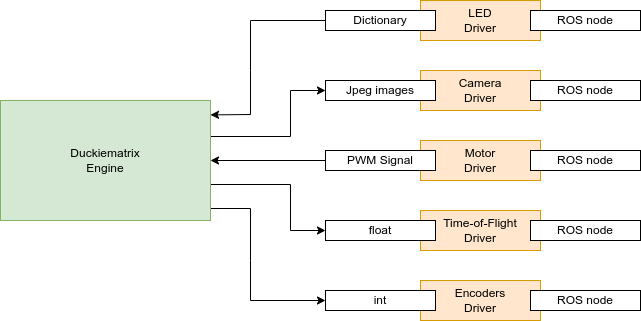
Fig. 11 Data types exchanged with the Duckiematrix by the virtual Duckietown robot drivers.#
Duckiedrone MAVLink Proxy Integration#
The virtual Duckiedrone uses a hybrid integration architecture. Like ground-based virtual Duckiebots, it uses direct driver bindings for sensors such as the camera and Time-of-Flight (ToF). For flight control, it relies on a MAVLink proxy routed through DTPS (Duckietown Postal Service), while IMU data is made available via MAVROS.
The following diagram illustrates how the components are connected:
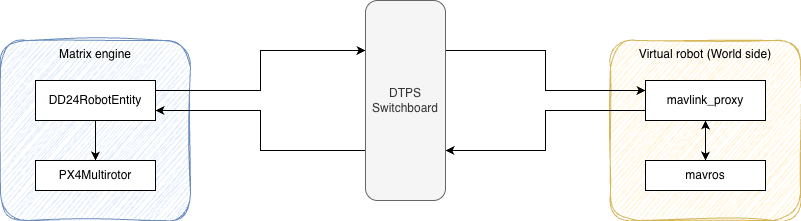
Fig. 12 Architecture of the MAVLink proxy connections between the Duckiematrix and a virtual Duckiedrone.#
The key components of this integration are:
RotorPy — a physics simulator for multirotor vehicles running inside the Duckiematrix Engine. It simulates the drone’s flight dynamics and produces sensor readings.
PX4 SITL — the PX4 flight controller running in Software-In-The-Loop mode on the virtual robot’s Docker environment.
MAVLink — the communication protocol used between PX4 SITL and the rest of the system.
DTPS MAVLink Proxy — a proxy that routes MAVLink messages over DTPS topics, bridging the PX4 SITL running on the virtual robot with the RotorPy simulation running inside the Duckiematrix Engine.
MAVROS — a ROS2 bridge that translates MAVLink messages into ROS topics, including IMU data published from PX4 SITL.
Implementation status#
Driver |
Implemented |
|---|---|
Camera |
Yes |
Time-of-Flight |
Yes |
IMU |
Yes |
LED |
Yes |
Encoder |
Yes |
Wheel |
Yes |